Using the OpenD6 Tools
In this section, we’ll talk about the following two use cases for these tools:
Creating and validating elements of a world, campaign, or encounter. This includes the DSL’s for spells, characters, creatures, etc. This the essential Create-Compute-Consider cycle.
Publishing documents for game masters and players.
We’ll start with using the tools to create things like Spells and Characters, and computing derived values like spell difficulty or the character dice budget.
Note
The examples use “docstring” examples.
The examples in this document use code prefaced with >>>.
This shows things as if you were typing them interactively to the Python interpreter.
This is not practical, but it’s the conventional approach to showing examples in Python documentation.
It makes it easy for tools to find and validate the examples.
Pragmatically, you’ll be creating cells in a Jupyter Notebook or writing text in a .py module file with a programming text editor.
Creation
These tools offer two languages specific to the OpenD6 TTRPG domain. (We call them “DSL’s”, Domain-Specific Languages.)
There are two sub-categories of languages with the OpenD6 domain: Spells and Characters. They have similar Python syntax. Otherwise, there’s little actual overlap. Spells and Items are focused on a difficulty budget. Characters and Creatures are focused on skills with a dice budget.
In a larger game context, a character’s skills determine how many dice they get to roll. The spell’s details (and the situation in the game) determine the difficulty that must be exceeded by a roll of the dice to make that spell work.
Spells, Invocations, and Items
The Spell DSL uses Python to do computations and transformations on a Spell definition. This also includes Invocations and magical Items – they’re all bundles of effects with additional aspects.
Here’s an example.
>>> from opend6_tools.magic import *
>>> example = Spell(
...     name="Example",
...     notes="Mage waves their hands and says the words",
...     skill="Transformation",
...     effect=SkillEffect("Acumen: testing", "+4D", "skill modifier"),
...     duration=DurationAspect("1 sec"),
...     range=RangeAspect("1m"),
...     casting_time=CastingTimeAspect("5 sec"),
...     speed=SpeedAspect.based_on("range", description="Instantaneous"),
...     other_aspects = {
...         "gestures": GesturesAspect("waves hands", "simple"),
...         "incantations": IncantationsAspect("says the words", "short"),
...     },
...     other_conditions = [GenericAspect(1, "Everything else is completed")],
... )
>>> example.difficulty
5
(Yes, there’s a bit of redundancy here. It’s helpful for pinpointing errors.)
The OpenD6 Rules list 8 characteristics of a spell: Skill Used, Difficulty, Effect, Duration, Range, Speed, Casting Time, and “Other Aspects”. This DSL is very close (but not identical) to the definition offered in the rules:
Skill Used is optional, and can sometimes be deduced from the effect definition.
Difficulty is not provided by the spell designer. This is computed from the details. The Python expression
example.difficultyreveals the computed difficulty.Three new characteristics are added to the spell definition: Name, Notes, and “Other Conditions”.
The “Other Aspects” of a spell have a specific list of allowed aspects.
The Effect of a Spell (or Invocation or Item) defines what happens.
There are a number of distinct specialized subclasses of Effect.
See Implementation for the complete reference.
Here’s the short list of effects, with examples.
|
Grants one of the defined special abilities with the given rank. |
|
Saddles a character with one of the defined disadvantages with a given rank and additional notes. |
|
Does the defined amount of damage. |
|
Provides the defied armor value, with additional notes. |
|
Grants a new skill to a character with the given number of dice. |
|
Modifies a character’s attribute. |
The following are often part of a CompositeEffect, and provides additional details on the scope of the effect:
|
|
|
|
In addition to the Effect of a spell, there are a large number of other Aspects. Here are the four required aspects for any Spell or Invocation:
|
|
|
|
|
This is the most common specification for speed.
Rather than state the range twice (once as range, and once as speed), it’s easier to use this |
|
‘r’ is short for ‘round’ |
Here are the aspects that are often included in the “other aspects” details of a Spell or Invocation:
|
The area of effect includes a large number of shapes, including circle, sphere, hemisphere, divination sphere, cone, wall, cuboid, and blast. |
|
|
|
|
|
|
|
|
|
|
|
|
|
Yes, the double ()’s are required to provide this kind of complex based-on computation. |
|
|
|
|
|
|
|
|
|
|
|
|
|
|
|
This is a zero-difficulty marker for additional skill details. |
|
These are sometimes used as other conditions that don’t fit any other category. |
The key benefit of this language is providing details in a way that’s amenable to automatic computations. This handles the bookkeeping around the aspects which increase the difficulty, distinct from aspects which decrease difficulty.
Characters
The DSL is based on Python, it defines a set of computations and transformations on a Character definition. Creatures can also be defined.
Here’s an example Character.
>>> from opend6_tools.character import *
>>> henchman = Character(
...     occupation="Henchman",
...     race="Human",
...     agility=Agility(
...         2*D,
...         {"fighting": 4*D, "melee combat": 3*D, "stealth": 3*D}),
...     coordination=Coordination(
...         2 * D,
...       {"lockpicking": 3*D, "marksmanship": 4*D}),
...     physique=Physique(
...         3 * D, {"running": 3*D+2}),
...     intellect=Intellect(
...         2 * D,
...     ),
...     acumen=Acumen(
...         2 * D,
...         {"hide": 3*D, "streetwise": 3*D, "tracking": 3*D},
...     ),
...     charisma=Charisma(2 * D),
...     move=10,
...     fate_points=0,
...     character_points=2,
...     body=13,
...     equipment="dagger (damage +1D), lockpicking tools (+1D to lockpicking rolls), soft leather armor (Armor Value +2)",
... )
>>> henchman.budget_check(CharacterBudget.NORMAL)
{'Attributes': '13D out of 18D', 'Skills': '29D+2 out of 7D', 'Options': 'Nothing'}
(Yes, there’s a wee bit of redundancy here. It’s actually helpful because it helps to pinpoint errors.)
The budget_check() method recapitulates the character’s budget for base attributes and specific skills.
See Implementation for the complete reference.
The basis for comparison is the starting budget for typical characters.
There are only a few essential Attributes, defined in the opend6_tools.character package.
Extranormal, either |
Each of these uses the following pattern:
Attribute(dice_code, {'skill': dice_code, ...})
For example:
>>> physique=Physique(3*D, {'lifting': +2})
The dice_code values use a small shift in syntax from the 2D+2 used in most rulebooks to to 2*D+2.
The * is part of using Python syntax for the DSL.
The skill names are those defined in the rules using all lower-case letters and surrounded by apostrophes (') or quotes (").
Consistency matters.
Here are a large number of advantages, disadvantages, and special abilities.
Here are the opend6_tools.character.features.Advantage subclasses:
Each of these has a rank, and any additional notes.
For example, Fame(2, "famous divorce settlement").
Here are the opend6_tools.character.features.Disadvantage subclasses:
Each of these has a rank, and any additional notes.
For example, Quirk(2, "Exaggerated gestures").
The Special Abilities each have a distinct cost for each rank.
Here are the opend6_tools.character.features.SpecialAbility subclasses:
SpecialAbility |
Rank Cost |
|---|---|
3 |
|
2 |
|
3 |
|
2 |
|
2 |
|
2 |
|
4 |
|
3 |
|
3 |
|
4 |
|
3 |
|
1 |
|
1 |
|
3 |
|
1 |
|
0 |
|
1 |
|
3 |
|
2 |
|
6 |
|
3 |
|
1 |
|
1 |
|
7 |
|
1 |
|
2 |
|
1 |
|
5 |
|
3 |
|
2 |
|
5 |
|
3 |
|
2 |
|
3 |
|
3 |
|
1 |
|
3 |
|
2 |
|
5 |
|
3 |
|
2 |
|
4 |
|
8 |
|
10 |
|
3 |
|
2 |
|
3 |
|
3 |
|
1 |
|
4 |
|
3 |
|
5 |
|
3 |
|
3 |
|
2 |
|
1 |
When these are created, you must supply a numeric rank value and optional notes with details on the ability. The cost, however, is a product of the desired rank and the rank cost for the given special ability.
We can use these Python class definitions as a DSL to write Spell, Invocation, Character, Creature, and Item descriptions. We can look at the dice budgets, make changes, and fine-tune the design. Because the DSL is tied to the rules, the resulting elements of a world, campaign, or encounter tend to be consistent.
There are a few tools we have to support processing Spells and Characters.
Supporting Functions
There are a few helpful functions that are part of these packages. For Spells (and Invocations and Items), there are two useful functions.
The
opend6_tools.magic.workbook.display()function shows some details of the spell and the difficulty computation. Theopend6_tools.character.workbook.display()function, similarly, shows details of a character.The
opend6_tools.magic.workbook.debug()function shows more in-depth details of the spell and the difficulty computation. Theopend6_tools.character.workbook.debug()function, similarly, shows details of a character.The
opend6_tools.magic.output.detail()function transforms spell definitions into RST for publication. Theopend6_tools.character.output.detail()function creates a character sheet in one of three forms: a short form for publication, and detailed form for publication, and a form that can be given to players to use.
The overall workflow, then, is this:
Define a
opend6_tools.magic.spells.Spelloropend6_tools.character.features.Characterobject.Display it to be sure it has the right characteristics and difficulty.
Then, use the publication tool-chain to create the final documents to be shared with game masters and players.
Publication
Publication works with Sphinx. (Alternative static content generating tools, like Hugo, also work. The core rule is the tool has to work with Restructured Text.) There is a multi-step transformation from idea to document.
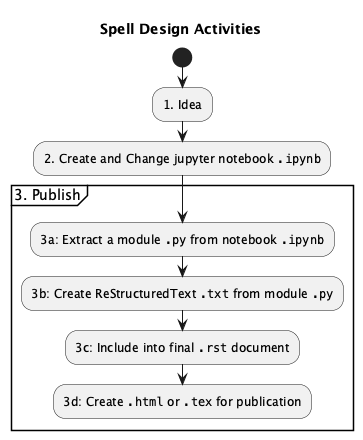
The notebook is a good place to start because it supports interactive computation. The Change-Compute-Consider cycle works out well using notebooks.
An extract from the notebook becomes a Python module. The module (which is an application) will emit ReStructured Text, RST, that’s used for publication.
The conversion of RST to HTML or to a PDF is not something we want to look at in detail. This is something we’re trusting other tools to handle for us. Examples include Sphinx and docutils. The goal of a world designer to to have source material for publication in RST notation.
Here is a very detailed view of the various documents – and extractions and conversions – involved in publication.
![@startuml
'https://plantuml.com/component-diagram
skinparam actorStyle awesome
title Final Publication
actor Designer
component "Jupyter Lab" as jupyter <<app>>
component Make <<app>>
boundary Browser
boundary Terminal
package book_source {
artifact "element.ipynb" as nb
artifact "element.py" as mod <<app>>
artifact "element.txt" as doc
artifact "document.rst" as book
/'
note "created by the designer" as note_1
note_1 ..> nb
note_1 ..> book
note "final output" as note_2
note_2 ..> web_page
'/
}
package book_build {
artifact "document.html" as web_page
}
package opend6_tools {
component "notebook_extract" as converter <<app>>
component magic
component character
}
nb ..> magic
mod ..> magic
Designer --> Browser : "2. Create Notebook"
Designer --> Terminal : "3. Publish"
Browser --> jupyter
jupyter --> nb
Terminal --> [Make]
[Make] --> converter : "3a. convert notebook"
converter <-- nb : "reads"
converter --> mod : "writes"
[Make] --> mod : "3b. create RST"
mod --> doc : "writes"
component "sphinx-build" as sphinx <<app>>
[Make] --> sphinx : "3c. include in final document"
sphinx <-- book : "reads"
sphinx <-- doc : "reads"
sphinx --> web_page : "3d. creates HTML"
@enduml](_images/plantuml-acc4c2a04a99b330808936389a5209348ec0d003.png)
While this is tangled, it’s a response to having two tasks with a profound conflict. (See the Tutorial for more background on this.)
Computing difficulty requires an interactive tool, responsive to user input, focused on the technical needs of conformance with the rules.
Publication turns words, spells, items, and characters into a single, published document. This is focused on content, organization, and style considerations, separate from the technical conformance with the rules.
The kind of tool that facilitates one task exacerbates the other. Specifically, the flexibility of a Jupyter Notebook doesn’t (readily) support publication. Extracting to a Python module provides a file that can be tested, used by any tool, and preserved as part of the source of the publications. The RST files are merely the first step in the publication chain.
The Final Publication diagram shows a number of transformations.
The notebook_extract app converts from
.ipynbto.py. The notebook, which has few rules or boundaries, is converted to an application module with a command-line interface usable by tools like make. For a “spells” conversion, only theSpellandInvocationcells are preserved. For a “characters” conversion, theCharacterandCreaturecells are preserved.The application modules extracted from notebooks will create RST-format files. These files generally have a suffix of
.txtto distinguish it from the manually-created RST files. The module can also produce debugging output as well as the RST for publication.The Sphinx tool converts the collection of
.rstfiles to any of the final publication forms. These forms include HTML, PDF, and EPUB, among others.
The diagram also shows two distinct interfaces to these tools:
An interactive Jupyter Lab session (in a browser) to create (and update) a notebook.
A terminal window to run the
makecommand to create the final HTML web page (or PDF or EPUB). This can also be run via the browser from within the Jupyter Lab environment.
There are other apps (including opend6_tools.notebook_extract and the module created from a notebook), but these are not often used directly by a designer.
These are part of the publication processing stream controlled by the make tool.
The notebook as a starting place is convenient, but not required.
A skilled Python developer can comfortably build the Python module directly.
Using the debug and display command-line options, they can edit and check their results from the terminal window.
The module’s CLI can display debugging information allowing a designer to change a module and compute the difficulties (or character budgets) entirely using command-line tools.
Files and structure
The designer must be cognizant of the files they will create and the transformations that will happen.
The designer creates book content in RST-formatted files. This is used to produce the final book as HTML, PDF, or EPUB. This uses
.. include::commands to include the.txtfiles created from the spell modules or character modules.A
.pymodule is the preferred format for the DSL. A small CLI application will emit RST-format files for use by Sphinx.The designer can create an
.ipynbnotebook, which is slightly easier than working directly with a module. Often notebooks are kept separate from the Sphinx content.
The relationships among these files leads to several individual Makefile instances to control publication.
These rules are not complicated, and are helpful to optimize the workflow.
Here’s how a spell’s RST might be included into a document.
Here's the **Quality Assurance** spell.

..  include:: spells/qa.txt

Maybe some more description of this spell.
An **example** can be helpful.
The details of how the file gets included are part of Sphinx. It’s the job of the writer to make sure the reference is in place.
For the include of qa.txt to work, we must be sure that the qa.py app was run and created the file.
This is generally a question of processing and control.
Processing and control
Control of the publication pipeline is delegated to the make tool. The make tool understands file dependencies, and the recipe that will create new file when the sources on which it depends change.
The essential command is this:
% make html
The assumption is that the book’s top-level directory
has the book’s conf.py and index.rst, created by the sphinx-quickstart command.
The make html will then process the entire rules document.
The document is rarely written entirely in the index.rst.
Instead, the index.rst depends on many files, often one per chapter.
One of these files is often spells.rst. The spells.rst has an .. include:: directive to gather content from the qa.txt file.
These two dependencies – document on a section and section on an included file – are handled by the Sphinx tool. If the dependency changes, the spells section must change and the overall document must change.
The qa.txt file depends on a qa.py module.
The module may, in turn, depend on a qa.ipynb file in a separate notebooks directory.
These dependencies are not visible to tools like Sphinx.
These files are created by dependency and recipe rules in separate Makefiles in the spells and characters directories.
A project will often have three distinct Makefiles:
The overall document
Makefile. This is generated by thesphinx-quickstartapplication. Theopend6_toolsrequire two modifications to this file.%: Makefile %(MAKE) -C spells %(MAKE) -C characters @$(SPHINXBUILD) -M $@ "$(SOURCEDIR)" "$(BUILDDIR)" $(SPHINXOPTS) $(O)
We’ve highlighted the two new lines used to invoke the make tool to update the spells and characters prior to publication.
The first new commands looks for a
spells/Makefileand uses this to update the spells. The second new command looks for acharacters/Makefile.These commands needs to reflect the overall structure of the document.
A
spells/Makefilewill update the RST files for spells and invocations. It looks like this:# Spells Makefile .phony: spells vpath %.ipynb ../../notebooks # Create a Python Spell module from a Jupyter Notebook with the same name. %.py : %.ipynb python -m opend6_tools.notebook_extract spells $< > $@ # Create an RST text file from a Python Spell module with the same name. %.txt : %.py python $< display > $@ spells : spell_1.txt spell_2.txt, etc.
The core recipes are provided. What’s requires is the definition of the
spellstarget. This lists all files that must be converted for the final documentation. The source files are implied by the recipes.A
characters/Makefilewill emit RST files for characters and creatures. It looks like this:# Characters and Creatures Makefile .phony: characters vpath %.ipynb ../../notebooks # Create a Python Character or Creature module from a Jupyter Notebook with the same name. %.py : %.ipynb python -m opend6_tools.notebook_extract characters $< > $@ # Create an RST text file from a Python Character or Creature module with the same name. %.txt : %.py python $< display --format SHORT > $@ characters : characters.txt creatures.txt
The core recipes are provided. What’s requires is the definition of the
characterstarget. This lists all files that must be converted for the final documentation. The source files are implied by the two recipes.
Note that there are a number of character formats.
The SHORT format is used for most descriptions of characters and creatures.
There are however, some longer formats available.
LONGVery detailed.LONG2Less detailed, often used for non-human races.SHORTThe kind of summary shown in the Adventure Tips chapter.TABLEA full character sheet using HTML table constructs.LITERALA full character sheet using RST literal constructs.
The need for some LONG2 characters for the non-human races,
and TABLE for the character templates will make the characters Makefile somewhat more complicated.