notebook_extract app
Spells and Characters (as well as Creatures) are defined in Python modules. This makes testing and publication relatively straightforward. The DSL is Python, the Python module can be tested, displayed, and debugged using a variety of software development editors and tools.
However, making changes to a module and considering the consequences of those changes is easier in Jupyter Lab. The tools is interactive, allowing immediate computation after a change. Introducing Jupyter Lab extends the build process slightly.
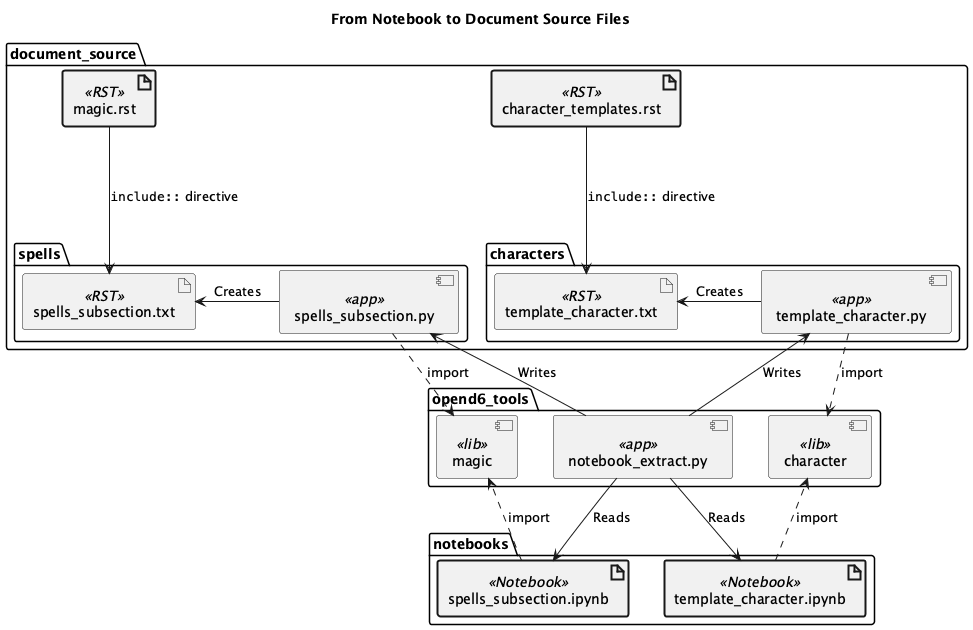
The following diagram shows how the opend6_tools.notebook_extract application pulls Spell (or Invocation) definitions from a notebook.
To help clarify the processing, here’s a sequence diagram.
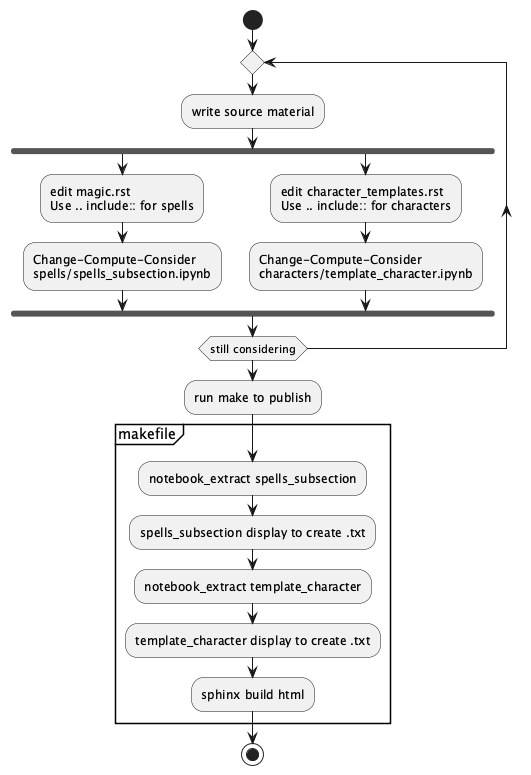
The details of executing the opend6_tools.notebook_extract application are packaged into a Makefile.
This makes it easier to focus on character and spell design.
The conversion from notebook to module and module to RST text is
all automated.
When engaging with the Change-Compute-Consider cycle, it can help to have formal test cases to be sure that a small change to a spell doesn’t make an unexpected alteration to the difficulty.
This can be included in a Notebook via Python assert statements that will validate
an aspect of a Spell (or Character.)
assert some_spell.difficulty == 42
This will become part of the __test__ definition in the spell module.
It is used by make to be sure the spell is defined properly, and there’s no
technical problem with the Python code.
Implementation
This application extracts Spell or Character definitions from a Jupyter Lab notebook file. This will create a Python module that’s part of the publication pipeline.
Input is a Notebook .ipynb file in which definitions have been created.
This includes Spell and all the various subclasses (Cantrip, Invocation, etc.)
It also includes Character and all the various subclasses (Creature, etc.)
Output is one (or more) Python modules with the Spell or Creature assignment statements from the notebook.
Additionally, an application to emit RST is embedded as well as a unit test suite.
There are several variations on the extraction process:
Spells:
One Python module with all
Spellassignments. Thespellbook_appembedded in the module builds RST.Several Python modules, organized by the
rankattribute of theSpell. Ranks are 5-point bands centered on 5, 10, 15, 20, etc. Thespellbook_appembedded in each output module is used to build the target RST-formatted file.
Characters and Creatures:
One Python module with all
Characterassignments. Thecharacters_appembedded in the module is used to build the target RST-formatted file.Several Python modules, organized by the
realmattribute of the creature.
Each module extracted from a notebook is a stand-alone application, complete with imports and a typer application object.
For spells, the import is opend6_tools.magic and the app is spellbook_app.
For characters (and creatures), the import is opend6_tools.character and the app is characters_app.
The extract looks for all cells that contain an assignment statement: name = TypeName(...).
It looks for opend6_tools.magic.Spell and all subclasses, including Cantrip, Miracle, and Invocation.
It also looks for opend6_tools.character.Character and all subclasses, including Creature.
Typical use is the following construct in a Makefile.
vpath %.ipynb ../../notebooks

# Create a Python Spell module from a Jupyter Notebook with the same name.
%.py : %.ipynb
    python -m opend6_tools.notebook_extract spells $< > $@
The vpath directive is used because notebooks are often kept separate from the source directories for
the final document.
API Reference
Top-Level Apps
The characters() function is an application that extracts Characters and Creatures from a Notebook.
- opend6_tools.notebook_extract.characters(source: ~typing.Annotated[~pathlib.Path, <typer.models.ArgumentInfo object at 0x1099ff4d0>], output: ~typing.Annotated[~pathlib.Path | None, <typer.models.OptionInfo object at 0x1099ff610>] = None, book_variable: ~typing.Annotated[str, <typer.models.OptionInfo object at 0x1099ff750>] = 'characters', groupby: ~typing.Annotated[str, <typer.models.OptionInfo object at 0x1099ff890>] = '', verbose: ~typing.Annotated[bool, <typer.models.OptionInfo object at 0x1099ff9d0>] = False) None[source]
Converts a notebook of characters or creatures to a Python module for publication.
The spells() function is an application that extracts Characters and Creatures from a Notebook.
- opend6_tools.notebook_extract.spells(source: ~typing.Annotated[~pathlib.Path, <typer.models.ArgumentInfo object at 0x1099fed50>], output: ~typing.Annotated[~pathlib.Path | None, <typer.models.OptionInfo object at 0x109e6ce10>] = None, book_variable: ~typing.Annotated[str, <typer.models.OptionInfo object at 0x1099fee90>] = 'spells', ranked: ~typing.Annotated[bool, <typer.models.OptionInfo object at 0x1099fefd0>] = False, verbose: ~typing.Annotated[bool, <typer.models.OptionInfo object at 0x1099ff110>] = False) None[source]
Converts a notebook of spells to a Python module for publication. For ranked output, the target will have a “_rank_xx” suffix appended to the filename stem.
Components
- class opend6_tools.notebook_extract.ModuleWriter(app_name='opend6_tools.notebook_extract')[source]
Defines the templates for creating a Python module from a Jupyter Notebook extract.
The
write_book()method creates the text body of a module. The result of this method can be written to a file with the.pyextension.This template injects the CLI application and unit test suites into the spell module.
- static book_slug(title: str) str[source]
Convert the book title to a slug without spaces.
- Parameters:
title – the Title
- Returns:
string slug with spaces replaced by “_”.
- write_book(*, book_type: str = 'spells', title: str = 'Untitled', definitions: Iterable[tuple[str, str | None]], book_variable_name: str = 'spells', tests: dict[str, str] | None = None) str[source]
Essential output of a book of Spells, Characters, Creatures, etc.
- Parameters:
book_type – The kind of book to be created.
title – The title to include in the Template.
definitions – The source text for Spells, Characters, etc.
book_variable_name – a global variable to assign as the list of defined values.
tests – a mapping used to build a doctest
__tests__global.
- Returns:
The string to write.
- opend6_tools.notebook_extract.subclass_iter(some_class: type) Iterator[type][source]
Emit a class and all it’s defined subclasses.
This is used to find all subclasses of
SpellorCharacter.
- class opend6_tools.notebook_extract.AssignmentVisitor(source: str, base_class: type = <class 'opend6_tools.magic.spells.Spell'>)[source]
Save the assignment statements from the various cells in the notebook.
The output from the
name_definition_iter()method is a sequence of tuples:("name", "name = Spell()")for each Spell found. The internaltarget_classesis the set class names to recognize.- name_definition_iter() Iterator[tuple[str, str | None]][source]
Iterates over names and definitions found in the source code.
- Returns:
sequence of tuple (variable, code block)
- test_condition_iter() Iterator[tuple[str | None, str | None]][source]
Iterates over the assert conditions of the form expr == literal,
- Returns:
sequence of tuple[expr, expr]
- class opend6_tools.notebook_extract.Extractor(source: Path, target_type: type = <class 'opend6_tools.magic.spells.Spell'>)[source]
Find the code cells and extract the sequence of assignment statements. These are (generally) the spell definitions.
Uses
AssignmentVisitorto locate the statements.- cell_analysis_iter() Iterator[AssignmentVisitor][source]
Examine the notebook, creating
AssignmentVisitorobjects for each code cell. These will produce assignment statements and test assertions. TheAssignmentVisitorfilters the code cell to be locate DSL definitions based on target classes likeSpellorCharacter.
- opend6_tools.notebook_extract.eval_cell(name: str, assignment: str, variety: EvalContext) tuple[str, Spell | Character][source]
Evaluate an assignment statement to a
Spell(orCharacter) object.- Parameters:
name – variable name from the source
assignment – Full assignment statement
name = Spell().variety – One of the
EvalContextvalues: MAGIC or CHARACTERS. This defines animportrequired to evaluate the expression.
- Returns:
tuple of (name, object)
- opend6_tools.notebook_extract.write_spells_ranked(book_variable: str, output: Path | None, source_name: str, spell_source: list[tuple[str, str | None]], tests: list[tuple[str | None, str | None]], writer: ModuleWriter) None[source]
Ranks spells and writes multiple files with spells extracted from a single source Notebook.
- Parameters:
book_variable – global variable name to use
output – output Path or None to write to stdout
source_name – Name of source notebook
spell_source – list of tuple[str, str] with spell name and assignment statement
writer – ModuleWriter instance to write.
- opend6_tools.notebook_extract.write_spells_unranked(book_variable: str, output: Path | None, source_name: str, spell_source: list[tuple[str, str | None]], tests: list[tuple[str | None, str | None]], writer: ModuleWriter) None[source]
Writes extracted spells from a single source Notebook to a single target module file.
- Parameters:
book_variable – global variable name to use
output – output Path or None to write to stdout
source_name – Name of source notebook
spell_source – list of tuple[str, str] with spell name and assignment statement
writer – ModuleWriter instance to write.
- opend6_tools.notebook_extract.write_characters(book_variable: str, output: Path | None, source_name: str, character_source: list[tuple[str, str | None]], writer: ModuleWriter) None[source]
Writes extracted characters to a single file.
- Parameters:
book_variable – global variable name to use
output – output Path or None to write to stdout
source_name – Name of source notebook
character_source – list of tuple[str, str] with spell name and assignment statement
writer – ModuleWriter instance to write.
- opend6_tools.notebook_extract.slug(group_name: str) str[source]
Convert a section title of a Character workbook into a summary slug.
- Parameters:
group_name – The text of the “realm” attribute of a
character.Characterorcharacter.Creature.- Returns:
A slug without spaces or punctuation.
- opend6_tools.notebook_extract.write_characters_byRealm(book_variable: str, output: Path | None, source_name: str, character_source: list[tuple[str, str | None]], writer: ModuleWriter) None[source]
Groups Characters by realm attribute and write multiple files from a single Notebook source.
- Parameters:
book_variable – global variable name to use
output – output Path or None to write to stdout
source_name – Name of source notebook
spell_source – list of tuple[str, str] with character name and assignment statement
writer – ModuleWriter instance to write.